



The consent gap: what 100 highly regulated UK websites still load after you click Reject all
Banks, insurers and wealth firms are some of the most closely watched businesses in the UK, and their cookie banners show it. Most now use a well-known Consent Management Platform (CMP), include Reject all on their consent banners and send Google the consent signals it asks for with Consent Mode. I’d argue that’s exactly why so few teams check what happens after the click.
The banner is only the part of consent management a visitor can see. We tested 100 highly regulated UK websites, comparing what loaded after Reject all with what loaded after Accept all. In 55 of the 100 sites tested, a tracking cookie, marketing tag or a testing tool still loaded after the visitor said no. Google’s own tags mostly behaved correctly, the gaps came from other platforms.
Why most consent checks stop at the banner
Most consent advice is about the banner. Search for cookie consent or Google Consent Mode in the UK and page one is mostly Google’s own help pages and set-up guides from consent tool vendors. The questions people ask follow the same line, from whether to accept or reject cookies to whether a site needs a banner at all.
That shapes how teams check their own sites. A typical review asks whether Reject all is as easy to find as Accept all, then stops. In my experience very few compare what the browser loads under each choice, which is what every figure in this piece measures.
How we tested 100 highly regulated UK websites
We tested 100 highly regulated UK websites between July and October 2026, 53 from banks, building societies and lenders and 47 from insurance, pensions and wealth firms. The list mixes household names with challenger and specialist brands, so it isn’t a random sample.
Each site was loaded from a UK location, on the homepage and one main product page. We visited twice, once after clicking the site’s own Reject all button and once after Accept all, then compared the tags, cookies and consent signals each visit produced.
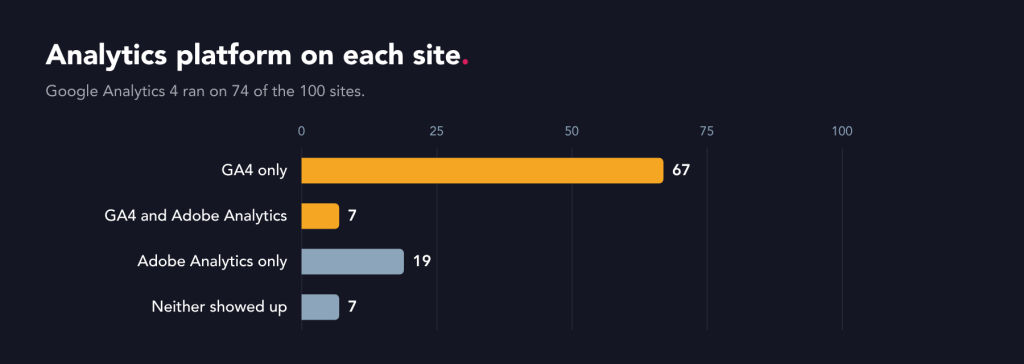
Before looking at how consent has been handled, it helps to know what these sites use. Google Analytics 4 appeared on 74 of the 100 sites and Adobe Analytics on 26, with 7 using both. That leaves 7 where neither tool showed up, with most of these using a server-side tag manager or enterprise tools such as Tealium, Celebrus and Piwik Pro. Google Consent Mode was set on 77 of the sites, with 46 in Advanced mode and 31 in Basic mode.
Testing from outside can’t see server-side processing, internal governance or how data is used, and nothing here is a legal assessment of any site. It does give a benchmark for how highly regulated UK websites handle a Reject all click.
What loads after Reject all on highly regulated UK websites
The banners do make a difference, with a median of 12 tags after Reject all against 23.5 after Accept all. So about half of each setup waits for consent, and the rest loads whatever the visitor chooses.
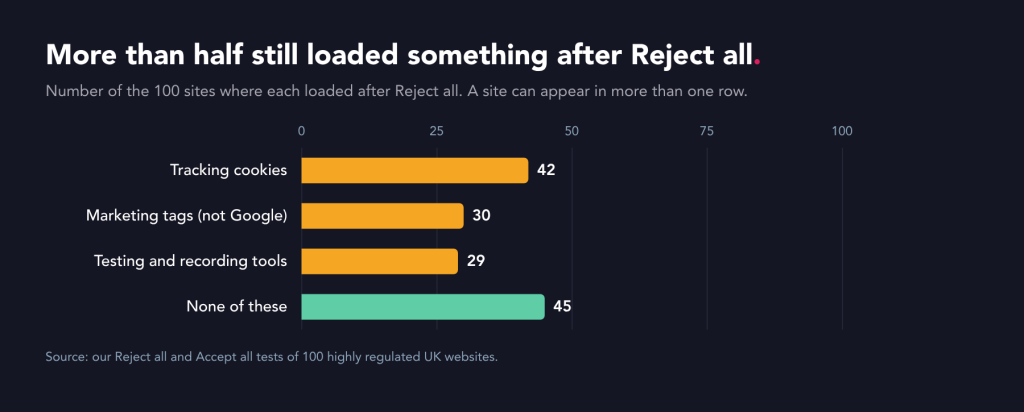
Here’s what we saw after clicking Reject all, across the 100 sites.
- Tracking cookies: 42 sites set an analytics, advertising or testing cookie.
- Marketing tags: 30 sites loaded a tag from a provider other than Google.
- Testing and recording tools: 29 sites loaded an A/B testing tool or a recording tool.
- No tracking set: 45 sites were clean of marketing, tracking and testing tools when Reject all was used.
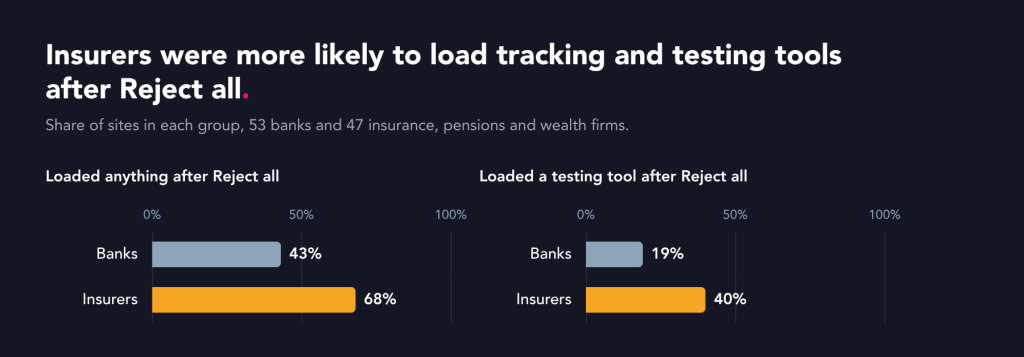
Banks performed better than insurers. 43% of banking sites loaded tracking after Reject all, against 68% of insurance, pensions and wealth management sites. The cleanest group was the large high-street banks and building societies, where 11 of 13 loaded nothing on the list.
The most common marketing tag firing after Reject all was Microsoft Advertising’s Universal Event Tracking tag, known as UET, which loaded on 15 of the 100 sites. Microsoft has its own modelled consent solution, separate from Google’s. 14 of those 15 sites had set up Google Consent Mode, which doesn’t automatically control the Microsoft tags.

What the Data (Use and Access) Act changes for cookies and tracking
The Data (Use and Access) Act’s cookie changes came into force on 5th February 2026, and the ICO published its guidance on storage and access technologies on 29th April 2026. The rule covers storing information on a device or reading what’s already there. That takes in pixels, local storage, fingerprinting and scripts as well as cookies.
That wider scope matters for every tag on our list. A tag can fall under the rule without setting a single cookie, because loading a script or reading the device counts too. Advertising sits outside all of the exceptions, which is why marketing tags after Reject all are the hardest finding to defend.
A/B testing and session recording tools after Reject all
Testing and session recording tools were the biggest difference between sectors. 19 of the 47 insurance and wealth management sites loaded one after Reject all, against 10 of the 53 banks. Optimizely and VWO each appeared on 9 sites.
Some teams will point to the new exception for statistics. The Data (Use and Access) Act added an exception for statistics, and the ICO’s guidance says A/B testing is likely to qualify for the exemption if the aim is overall statistics, visitors are informed, and have an easy way to object. We treat a Reject all click as that objection, so a testing tool shouldn’t set or read cookies once a visitor has made their objection clear. Yet 15 of the 20 sites running A/B testing or personalisation set the testing tool’s own cookies after Reject all.

Before a visitor chooses, the only set-up we’d recommend is one that works like Google’s Consent Mode. The testing tool loads without cookies, waits for consent and stops if the visitor refuses.
13 sites ran session recordings or heatmaps, some alongside A/B testing. The ICO’s guidance says recordings of individual visitors still need consent.
How Google Consent Mode v2, GA4 and Adobe handle Reject all
Google Consent Mode v2 is the setting that tells Google’s tags what a visitor agreed to. In Advanced mode, Google’s tags load before the choice and send cookieless pings when consent is denied. In Basic mode, they wait for the choice. Google cookies appeared after Reject all on only 9 sites, so Google’s own layer mostly worked.
The problem is that Consent Mode only governs Google. Of the 46 sites running Advanced Consent Mode, 30 (65%) loaded a cookie or tool from another company after Reject all, against 13 of the sites running Basic Consent Mode (42%). To me, this suggests that sites choosing Advanced mode for more data often let other marketing tags load too, whether on purpose or by oversight.

Adobe sends no consent signal of its own, so it depends on how the tag manager and consent tool are wired together. Adobe cookies were set after Reject all on 19% of the 26 sites using Adobe Analytics. Even so, sites using only Adobe were cleaner overall, with 26% of the Adobe-only sites loading something after Reject all against 60% of the GA4-only sites.
Server-side tagging sends tracking data through the company’s own server before it reaches vendors. 9 of the 10 sites using it still loaded a cookie or tool in the browser after Reject all. It changes where data goes, but the consent choice still happens in the browser.
What to fix first after Reject all
Five changes close most of the gap we found.
- Give consent management an owner: one named person should be responsible for everything that loads before and after a visitor rejects cookies.
- Keep a register with a reason for every tool: mark each one as strictly necessary, covered by the statistics exception, or needing consent, and treat Reject all as a no for everything else.
- Put a consent rule on every non-Google tag: Microsoft, Adobe, LinkedIn, Meta and testing tools each need their own rule in the tag manager.
- Run testing tools without cookies until consent: load an A/B testing tool before the choice only if it can respect consent signals, storing nothing until the visitor accepts and stopping when they reject.
- Make consent part of release sign-off: many of these issues look like tools added after the consent set-up was signed off. Managing compliance should be an ongoing task.
The banner was the easy part
Highly regulated sites have largely solved the part of consent a visitor can see. What we found is a second layer that nobody quite owns. It might be the testing tool a trading team added last spring, or the Microsoft tag that arrived with a new paid search agency. None of these tools checks the visitor’s choice unless someone adds a consent rule for it.
If you’d like to see where your own site sits against this benchmark, we can run the same Reject all and Accept all comparison in confidence and share the results with you. Before that, it’s worth putting one question to whoever owns your tag manager. If someone clicked Reject all on your site tomorrow, which tool would load that nobody on your team could explain?
Frequently asked questions
What happens if you reject all cookies?
When you reject all cookies on a UK website, only strictly necessary tools and tools covered by an exception in the UK’s cookie rules should store or read information on your device. That includes security, load balancing and the cookie that remembers your choice. Advertising tags don’t qualify, and we’d treat A/B testing tools the same way once a visitor has refused. In our study of 100 highly regulated UK websites, 55 still loaded a tracking cookie, a marketing tag or a testing tool after Reject all.
Do you need cookie consent for Google Analytics?
Google Analytics usually needs cookie consent in the UK. The Data (Use and Access) Act’s statistics exception can cover analytics, but the ICO’s guidance says a third-party provider must act only as a processor and use the data only to help improve your site, and visitors must be told and given a simple way to object. Unless a site has set up Google Analytics to meet all of those conditions, we’d treat it as needing consent.
Is Google Consent Mode mandatory?
Google Consent Mode isn’t a legal requirement in the UK. Google requires advertisers to send consent signals for users in the European Economic Area to keep using its measurement and remarketing features, and its help page on this doesn’t mention the UK. The legal duty under the UK’s cookie rules is to get consent, or rely on a valid exception, before storing or reading information on a visitor’s device. Consent Mode only controls Google’s tags, so it can’t cover the rest of a site’s tools.
Does Microsoft UET need consent?
Microsoft Advertising’s UET tag is used for advertising, which falls outside the exceptions in the ICO’s guidance on storage and access technologies, so it needs consent in the UK. Microsoft’s UET consent FAQ says IDs such as MUID and _uetvid shouldn’t be set after a visitor refuses. In our study of 100 highly regulated UK websites, UET still loaded after Reject all on 15 sites.
Do A/B testing tools need cookie consent in the UK?
A/B testing tools shouldn’t set cookies on a UK website after a visitor clicks Reject all. The Data (Use and Access) Act 2025 added a statistics exception, in force for cookies since 5th February 2026, and the ICO’s guidance says A/B testing is likely to qualify only where visitors are told and can object easily. A Reject all click is an objection, so before consent an A/B testing tool should run only in a consent-mode-style set-up that stores nothing until the visitor accepts. Session recordings of individual visitors always need consent.
Sources
- Microsoft Advertising, FAQ, UET and user consent, last updated 27th July 2026: learn.microsoft.com/en-us/advertising/msa-help/hlp_ba_conc_uet_consentfaq
- ICO, What are storage and access technologies?: ico.org.uk, storage and access technologies
- ICO, What are the exceptions?: ico.org.uk, storage and access technologies, exceptions
- ICO, How do the rules apply to online advertising?: ico.org.uk, storage and access technologies, online advertising
- ICO, Final storage and access technologies guidance published, 29th April 2026: ico.org.uk news, April 2026
- The Data (Use and Access) Act 2025 (Commencement No. 6 and Transitional and Saving Provisions) Regulations 2026, SI 2026/82: legislation.gov.uk/uksi/2026/82/made
- Google, Consent mode overview, Tag Platform documentation, last updated 30th July 2026: developers.google.com/tag-platform/security/concepts/consent-mode
- Google Ads Help, Updates to consent mode for traffic in the European Economic Area (accessed 12th October 2026): support.google.com/google-ads/answer/13695607
- Our consent gap dataset: Reject all and Accept all tests of 100 highly regulated UK websites, July to October 2026 (anonymised).