Skip to content

Accessibility regressions and the underused tools that catch them
Accessibility audits usually end in the same underwhelming way. A report arrives, a backlog forms, a few sprints of fixes follow, and the site passes more of the Web Content Accessibility Guidelines (WCAG) than it did before. When the next audit turns up the same kinds of problem again, the usual conclusion is that the team needs a bigger platform or a paid scanner.
However, the tools that stop a site sliding back already exist, and most of them cost nothing. When I re-audit a site a year after we’ve worked on it, and the team hasn’t yet had training or the right tools, I usually find it has slipped back a long way.
The right tools and training belong where regressions get in. That’s usually the content editor, the build, the tester’s browser and the QA process itself. What’s missing is adoption.
WebAIM’s 2026 scan of the top 1,000,000 home pages recorded 56.1 detectable errors per page, up from 51 a year earlier. Almost every page, 95.9% of them, had at least one detectable failure. You can read more about our accessibility practice, or see what’s involved in evaluating a site’s accessibility properly.
Why do websites become less accessible after an audit?
An audit records how a site performed while it was being tested. After it, every content edit, component release and app build is another chance to bring back a barrier the audit found.
The same WebAIM data shows one way regressions get in. Accessible Rich Internet Applications (ARIA) attributes are the code developers add to describe custom components to assistive technology. They appeared on 82.7% of home pages in 2026, at an average of 133 per page, and their use grew 27% in a single year.
Pages with ARIA averaged 59.1 errors, against 42 for pages without it. That’s a correlation, since complex pages tend to carry more ARIA and have more to get wrong. Even so, a 17-error gap across a million pages deserves attention.
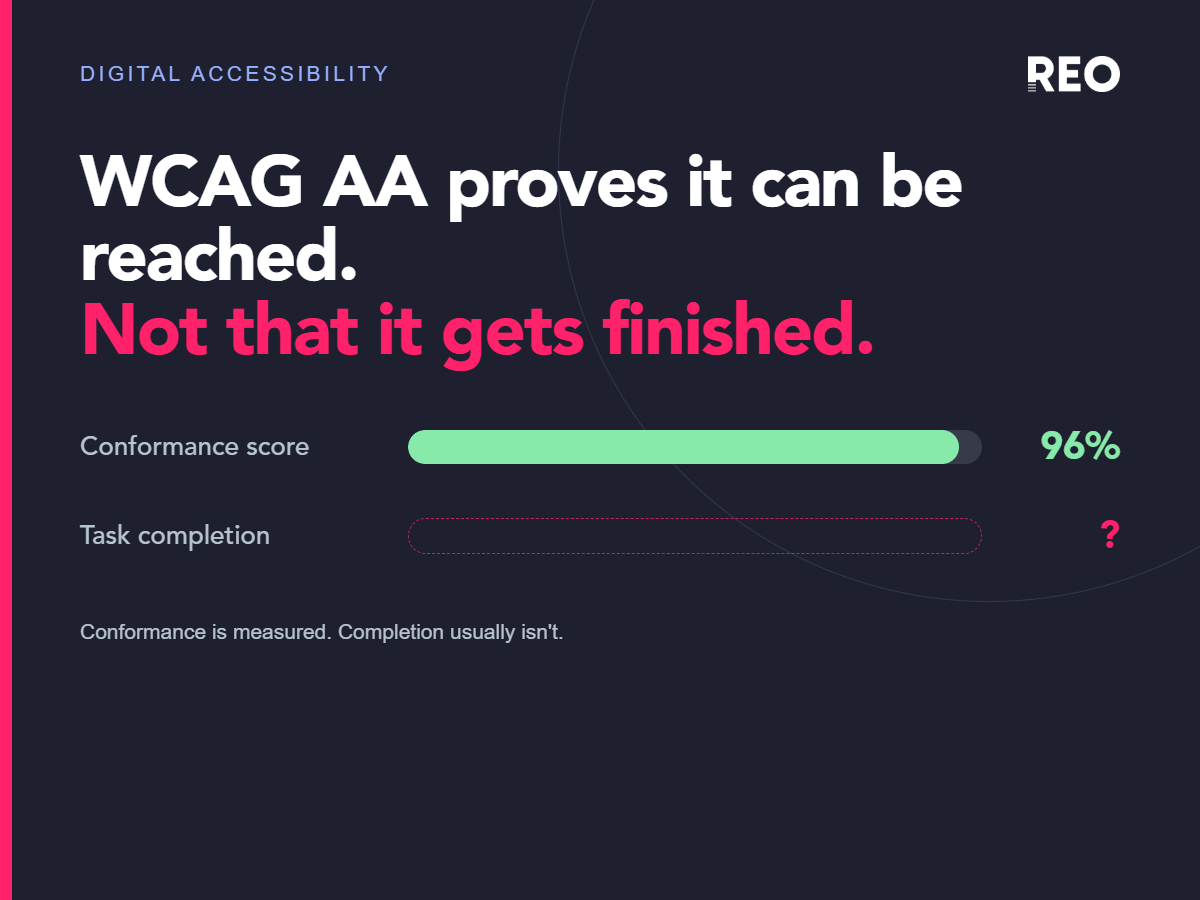
The familiar scanners don’t close this gap, because they run at the wrong moment. Somebody opens axe or Lighthouse when they remember to, usually near launch. One analysis found only 6 of WCAG 2.2’s 55 applicable success criteria can be tested by automation alone, so a scan catches a small share of problems, and catches them late.
We’ve covered that limit in our piece on why a conformance score says little about customer experience. The question here is narrower. Which tools catch a regression at the point it enters?
Accessibility checkers for content editors
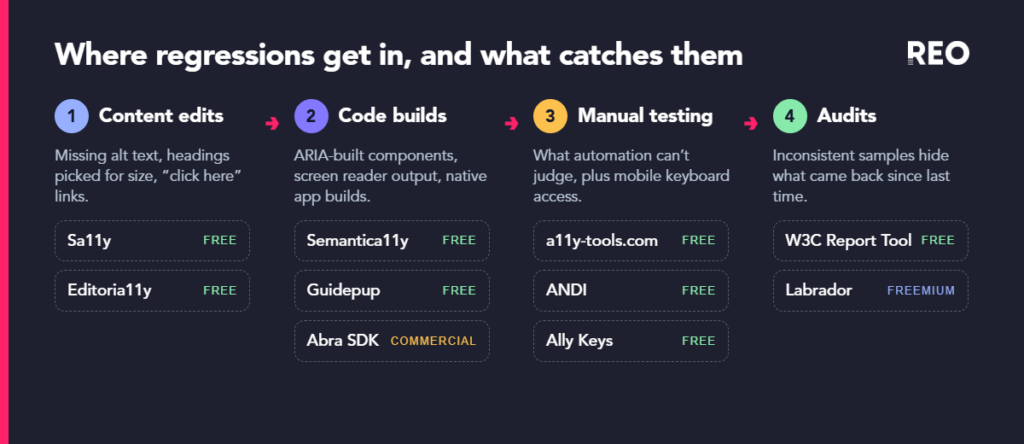
On a marketing site, many regressions come from content. An image goes up without alternative text, a heading is picked for its size, or a link says “click here”. Developer tools rarely catch these, because content editors don’t usually run them.
Sa11y and Editoria11y put the check inside the content management system (CMS), where the edit happens. Sa11y began as a university’s checker for the hundreds of authors on its own CMS and went open source in 2020. The checker now runs more than 80 tests and plugs into WordPress, Drupal and Joomla, with a bookmarklet for any other page.
Editoria11y checks content live while an author edits, and was built to catch problems added after launch. In 2026 the two projects began merging their rulesets, so whichever one a team picks will check content in much the same way.
There’s a standards case too. EN 301 549, the technical standard behind the European Accessibility Act, says authoring tools should help authors produce accessible content as well as allow it. The Authoring Tool Accessibility Guidelines (ATAG) go further, though they’re optional. An inline checker in the CMS is a practical way to meet that requirement.
Automated accessibility testing in the build
Code regressions need a check that runs on every change. Semantica11y, a small open-source package, scans markup for components built from ARIA and suggests the native HTML element that would do the job. For example, it would suggest a header element in place of a div given a banner role. That turns the World Wide Web Consortium’s (W3C) ARIA in HTML rules into something a pipeline can enforce, which matters given the error gap above.
Guidepup goes a step further and drives VoiceOver and NonVisual Desktop Access (NVDA) from test code, so a test can check what a screen reader announces.
Web testing tools can’t test native apps. The Abra software development kit (SDK), a commercial product, runs 13 rules made up of more than 40 checks inside existing iOS and Android interface tests, including apps built in Flutter and React Native. Its maker is candid about the limit, saying automated testing is “highly effective for detecting recurring accessibility issues and preventing regressions, but manual testing remains essential.” The same company co-founded Appt, a non-profit knowledge base with free code samples for iOS, Android, React Native, Flutter and Xamarin.
Manual accessibility testing tools that save time
Automation leaves most criteria to people, so small tools that speed up manual testing are worth having.
The bookmarklets on a11y-tools.com were built by a working auditor to draw overlays that screenshot cleanly into a bug report. That helps a developer understand a problem as soon as it’s reported.
The Accessible Name and Description Inspector (ANDI) is a free, open-source bookmarklet from the US Social Security Administration. It has 18 testing modules and forms part of the toolkit behind federal Trusted Tester certification.
Mobile keyboard testing is fiddly to set up, so it’s often dropped when a sprint runs short. Ally Keys replaces the keyboard with a small Bluetooth chip and puts the keys on a web page, which also shows screen reader commands for anyone watching. It was built by one developer, and it takes away most of the set-up work.
Keeping accessibility audits consistent
If each audit uses a different sample, template and reading of the criteria, comparing one year with the next is guesswork. A regression can then go unnoticed, because nobody can tell a new problem from a change in method.
The W3C published version 2.0 of its WCAG evaluation methodology on 23rd July 2026, widening it from websites to apps, kiosks and documents. The method asks for a structured sample with a random 10% added on top, and every step of any process that’s sampled at all. The W3C’s free Report Tool, updated to version 4.1.0 in August 2026, walks an evaluator through those steps and assembles the report at the end.
Labrador, a commercial manual testing platform with a free tier covering one project, gives manual testing a guided structure. The platform tracks remediation per criterion on every page and pushes issues into Jira. Either route gives the next audit a baseline to compare against.
Which accessibility testing tools to add first
Where regressions get in, and what catches them
What would your next audit find?
If your next audit found the same problems as the last one, could you say which came back through the CMS, which arrived with a new component, and which were never fixed at all?
If you can’t, that’s where we’d start. If a second opinion on where your regressions come from would help, talk to our accessibility team.
Frequently asked questions
Can accessibility testing be automated?
Partly. Automated tools can flag missing attributes, contrast failures and invalid ARIA, but they can’t judge whether alternative text is meaningful or whether a journey makes sense. One 2025 analysis found only 6 of the 55 applicable WCAG 2.2 success criteria can be tested fully by automation, so automated checks work best as regression guards between manual audits.
How do you automate accessibility testing?
Run checks where changes happen. A CMS checker such as Sa11y or Editoria11y tests content as authors edit it. Build-time tools such as Semantica11y and Guidepup test code on every change, and the Abra SDK does the same inside iOS and Android interface tests. Manual audits can then focus on what automation can’t judge.
How do you test screen reader accessibility?
Test with the screen readers people use, which means VoiceOver on Apple devices, NonVisual Desktop Access (NVDA) and Job Access With Speech (JAWS) on Windows, and TalkBack on Android. TetraLogical publishes free tables showing how six screen readers announce common HTML elements. Guidepup can automate VoiceOver and NVDA in test code to catch announcement regressions between manual sessions.
What tools help maintain accessibility across large content estates?
Inline CMS checkers are the most direct option. Both Sa11y and Editoria11y are free, open source and run inside WordPress, Drupal and Joomla, flagging issues such as missing alternative text and skipped headings while authors edit. On large estates they help stop new content undoing earlier fixes.
What are the best free accessibility testing tools?
Beyond the well-known scanners, there are free tools for each point where regressions get in. The W3C Report Tool structures audits, and the Accessible Name and Description Inspector (ANDI) from the US government supports manual testing alongside the a11y-tools.com bookmarklets. Sa11y and Editoria11y serve content editors, Semantica11y checks semantic HTML, Guidepup automates screen readers and Appt provides mobile code samples.
How do you test mobile app accessibility?
Combine automated checks in the build with manual testing on real devices. The Abra SDK, a commercial product, runs accessibility checks inside iOS and Android interface tests. Manual sessions should cover VoiceOver, TalkBack and an external keyboard, which Ally Keys makes easier to connect and demonstrate.
Sources
- WebAIM, The WebAIM Million: the 2026 report on the accessibility of the top 1,000,000 home pages (February 2026, updated 30th March 2026). Automated WAVE scan, so detectable errors only.
- Steve Faulkner, A tool’s errand, HTML Accessibility (March 2025, updated August 2025). Source of the 6 of 55 WCAG 2.2 criteria figure.
- Toronto Metropolitan University, Sa11y, the accessibility quality assurance assistant (version 5.0.9, checked 29th September 2026).
- Editoria11y, Features (checked 29th September 2026), including the 2026 ruleset merge with Sa11y.
- Hidde de Vries, On authoring tools in EN 301 549 (April 2024) and ATAG: the standard for accessibility of content creation (May 2022). Secondary reading of clause 11.8.2.
- Mark Steadman, Semantica11y (GitHub, MIT licence, version 1.0.1).
- W3C, ARIA in HTML.
- Craig Morten, Guidepup: screen reader automation library for testing.
- Abra, Mobile accessibility testing SDK for iOS and Android (vendor product page, checked 29th September 2026), and Appt (homepage, checked 20th October 2026, lists documentation for iOS, Android, React Native, Flutter and Xamarin).
- Ian Lloyd, a11y-tools.com bookmarklets, with authorship confirmed in TetraLogical, Meet the team: Ian Lloyd (October 2025).
- Section508.gov, Tools for testing ICT and ANDI tool overview.
- Quintin Balsdon, About Ally Keys.
- W3C, WCAG Evaluation Methodology (WCAG-EM) 2.0, Group Note (23rd July 2026).
- W3C, WCAG-EM Report Tool (version 4.1.0, 11th August 2026).
- Labrador Accessibility Inc., Labrador and pricing (vendor pages, checked 29th September 2026).
- AccessibleEU, The European accessibility standard EN 301 549 has been updated (7th September 2026).
- TetraLogical, Screen reader HTML support tables (July 2025, updated August 2026).